-
THE ULTIMATE KITCHEN UPGRADE
Kitchen Display System
Paper tickets only slow kitchens down. A KDS digitizes your workflow, slashing prep times and ensuring 100% order accuracy.
-
MULTI-CHANNEL MASTERY
UNIFY YOUR ORDER STREAMS
Whether it’s dine-in, takeout, or delivery, a Kitchen Display System aggregates every order into one logical flow.
-
DATA-DRIVEN DINING
KDS: YOUR BRAIN IN THE KITCHEN
You can’t manage what you don’t measure. A modern KDS tracks every second of production, giving you the analytics to cut waste and boost your daily revenue.

What Is a Kitchen Display System?
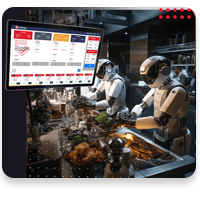
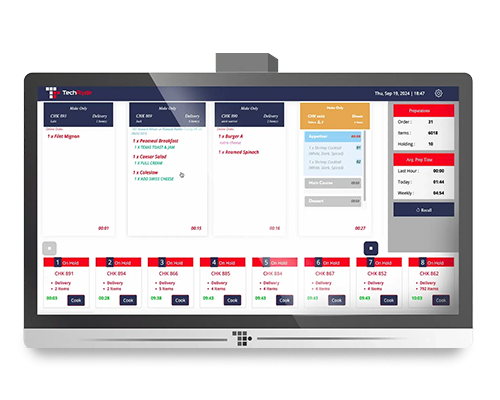
A kitchen display system (KDS) is a digital solution that replaces traditional paper tickets in restaurant kitchens. Orders placed through a restaurant’s order entry system are displayed in real time in kitchen on digital displays.
Kitchen display systems are designed to support different styles of kitchen workflows by:
Kitchen Display System (KDS) vs Kitchen Display Screen
Aspect
Kitchen Display System (KDS)
Kitchen Display Screen
What Are the Different Types of Kitchen Display Systems?
Kitchen display systems are available in different forms, depending on how they are designed and how they integrate with a restaurant’s operations. Some systems are simple and limited in scope, while others offer greater flexibility and scalability.
3 Common Types of Kitchen Display Systems Include
Onboard KDS
Hardware-Based KDS
Integrated KDS
Display Orders from All Sources on One Screen
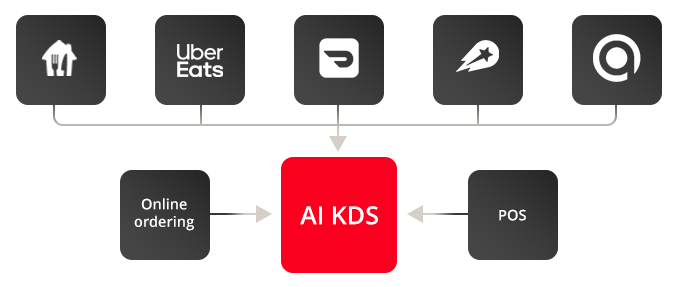
A kitchen display system collects orders from different ordering sources and displays them on a single kitchen screen. Whether orders are placed at counter, online, or through 3rd party delivery services, all incoming orders are sent directly to the kitchen for preparation and fulfillment.
Adapts to Different Kitchen Workflows
A kitchen display system is designed to adapt to how a kitchen operates. It can be configured to match existing kitchen layouts, station responsibilities, and preparation processes, allowing orders to be displayed and managed in a way that aligns with daily kitchen operations.